Trinet app
The Trinet app for Android is the companion for every Trinet camera. Use it to:
- preview and record over USB, with motion data and audio;
- review recordings frame by frame with the motion data overlaid;
- change camera settings — picture, sound, video, recording codec and more;
- update the camera's firmware;
- watch cameras and kits recording to their own cards, over Bluetooth.
Requirements
| Android | 9 or newer |
| Phone | USB-C with USB host (OTG) support |
| Bluetooth LE | Optional — only for Wireless status |
| Cameras | Every Trinet camera. Features that need newer camera firmware say so in the app. |
First connection
- Put the camera in USB webcam mode: power it without a memory card. The light turns white. (See Recording modes.)
- Connect it to the phone with a USB-C cable. The app opens automatically when a Trinet camera is plugged in.
- The home screen shows Camera found – Tap to allow access. Tap it and allow access in the Android dialog. (Android asks for the camera permission too — USB video needs it.)
- The status changes to Camera ready.
Home screen
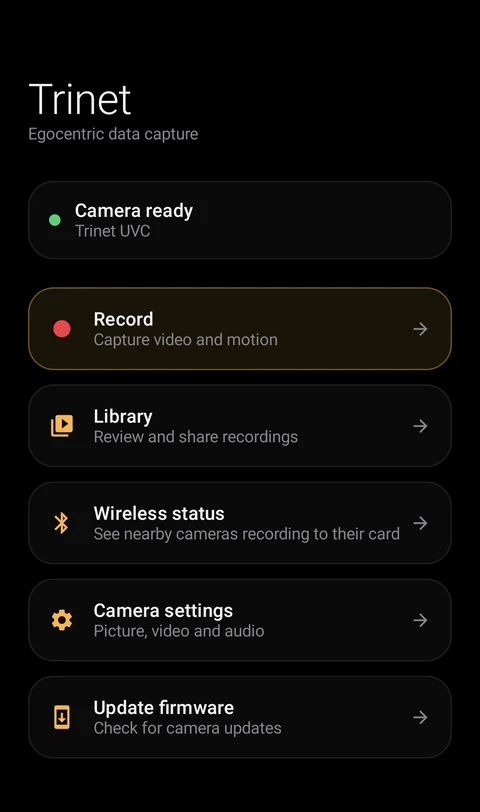
| Tile | What it's for |
|---|---|
| Record | Live preview and recording — Record and review |
| Library | Your recordings on the phone |
| Wireless status | Cameras and kits recording to their cards nearby — Wireless status |
| Camera settings | Picture, sound, video and advanced settings — Camera settings |
| Update firmware | Check for and install camera firmware — how to update |
The app uses a dark interface on purpose, so you can judge the picture accurately.
Build your own app
Everything the app does is available to developers in the Trinet SDK, with a demo app you can build from source.